


Enjoy - AI Town
4.51.20K Reviews
App Specs
- Version
- 1.1.50
- Updated On
- License
- Free
- Downloads
- 100,000+
- Developer
- Enjoy Global, Inc.
- Categories
- Entertainment
- Platform
- Android
Screenshots




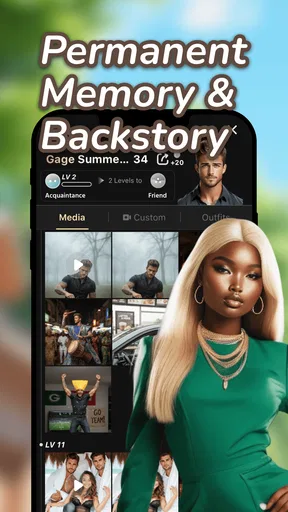

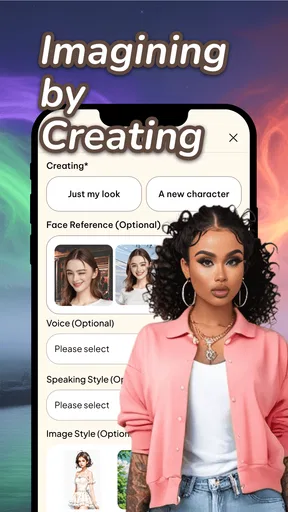
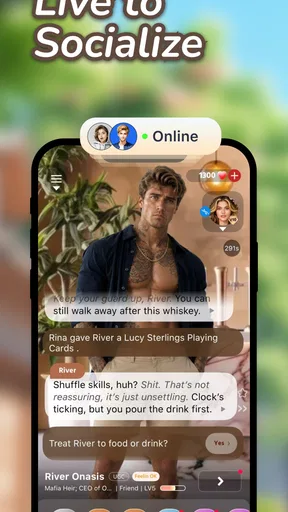
 Analysis by AppCompare
I’m most interested in Enjoy - AI Town as a place to shape ideas with AI, rather than as a conventional entertainment app to dip into for a quick distraction. That distinction matters: its appeal depends on whether you enjoy making things and seeing where a prompt can lead. If you’re curious about building an imaginative setting or getting a story started, the premise has room to be useful. If you mainly want a finished story or a passive feed to browse, the creative work may feel like extra effort.
What an AI co-writer changes
The feature that gives the app its clearest purpose is its AI-driven story generator. Rather than starting with a blank page and having to invent every turn yourself, you can begin with a few prompts and use the generated direction as a way into a story. I find that most valuable as a source of momentum: a suggestion can give me something specific to react to, whether I build on it, change it, or decide it is not the direction I want.
That is a different kind of help from a standard writing prompt list. A list hands you a starting point and leaves the rest to you; an AI co-writer can provide material that you can treat as a draft or jumping-off point. The trade-off is that generated ideas still need your judgement. I would not assume the first response is the best one, or that a story will feel personal without your own choices shaping it.
The app’s wider creative framing makes that starting point feel suited to a world rather than just a standalone paragraph. Its store summary is “Create the Life You Want,” and the short description calls it “AI Town.” In practical terms, I’d approach it with a small, clear idea—a character, a mood, or a situation—rather than a huge, complicated brief. That gives you a manageable result to assess and makes it easier to decide what you want to change next.
Turning a loose idea into a usable session
When I sit down to make something, I prefer to decide what I want from the session before I begin. Am I looking for a surprising premise, a scene to develop, or a way past a block? That simple choice keeps me from treating every generated suggestion as something I must accept. The useful workflow is to give the AI a direction, read what comes back with a critical eye, and then take ownership of the parts that interest you.
A practical tip is to keep the first request narrow enough that you can tell whether the result fits. If you ask for too much at once, it becomes harder to identify which part is working and which part needs a rethink. I’d also keep a note of the details I want to preserve as I continue: a character’s motivation, the mood of a scene, or the central conflict. That makes it easier to steer your creative choices instead of drifting wherever the latest suggestion points.
For a realistic everyday use, imagine having a spare half-hour after work and wanting to write but not knowing how to begin. You could open the app with one simple idea, use the generator to get a first direction, and spend the rest of the session choosing what to keep and what to reshape. That is a more satisfying goal than expecting a polished finished story in one sitting. The AI can reduce the friction of starting, while the meaningful creative decisions remain yours.
Worth Reading Before You Choose

Flipboard Shows What News Apps Must Do Beyond the Feed

Switching to Android Auto Means Rethinking Your Driving Routine

Google Calendar Makes a Crowded Week Easier to Manage

Ludo King Makes the Most of the Minutes Between Plans

Baby Panda World Brings Quick Play to Modern Phones, but Its Game Library Feels Busy

ESPN’s Live Game View Makes Following Close Games Easier
Where the town and other users fit
The shared side of the app offers a different reason to spend time there. You can explore other users’ worlds, share your own creations, and take part in collaboration. Comments and remixing can make a creation feel less like a private exercise: another person’s response may point out an angle you missed or give you a fresh direction to try.
I’d use that community as inspiration, not as a measure of whether my own work is good enough. Browsing other people’s creations can be energizing, but it can also turn a relaxed session into an endless scroll if I open the app without a purpose. A useful habit is to decide whether you are there to make something or to explore, then give that activity your attention. If you find a creation you like, focus on what specifically caught you—the premise, the character, or the way the idea was developed—rather than trying to copy its whole approach.
Collaboration and remixing are especially appealing when you have an idea but want to see how another person might interpret it. They are less useful if you want complete control over a project or prefer to keep your writing private. Before sharing, I’d make sure the work is at a point where I’m comfortable receiving feedback and seeing others respond to it. That small pause helps set expectations: a shared creative space can bring encouragement, but not every comment will match the direction you had in mind.
Choosing the right expectations
As an entertainment app, it sits between a writing tool and a social creative space. A conventional writing app is a better fit when you want a dependable place to draft and organize your own text without AI suggestions or community activity. A story prompt app may suit you better if you want a quick idea and do not want to explore a larger creative world. This app makes more sense when the combination of AI-assisted creation and shared user-made worlds is part of the fun.
There are trade-offs to that combination. A generated suggestion can help you move forward, but it can also send your work toward an idea you would not have chosen yourself. Community browsing can uncover inspiration, but it takes attention away from making your own creation. And if your goal is a finished, carefully edited piece, you should expect to review and revise the result yourself rather than treating AI output as ready to publish.
Cost is another point to consider before making the app part of your routine. It is free to download, but it includes in-app purchases ranging from $0.99 to $549.99 per item. I’d check the purchase details in the app before spending and decide whether any paid option is worthwhile for how I actually use it. The wide range makes it especially sensible to avoid tapping through a purchase without first understanding what is being offered.
The age rating is Teen, so I would not choose it as a child’s app without considering whether its social and creative environment is appropriate for the young person using it. Anyone who needs a tightly controlled writing space, a fully private experience, or a strictly predictable source of entertainment may be better served by a simpler alternative.
Who is likely to enjoy it most?
I’d recommend it most to people who like experimenting: aspiring writers who need a nudge, imaginative users who enjoy shaping characters and settings, and creators who are interested in seeing how others respond to their work. It can also suit someone who wants a low-pressure activity for short creative sessions, provided they are happy to guide and edit what the AI produces.
It is less suited to readers looking for a finished narrative, writers who dislike AI-generated suggestions, or anyone who wants a straightforward tool with no social element. If you already know exactly what you want to write and prefer a distraction-free editor, the extra creative and community layers may get in your way rather than help.
Enjoy Global, Inc. is the developer, and the app is free in the entertainment category. It has a 4.5 average from around 3.1 thousand ratings, with 10 thousand or more installs; the store also lists 149 written reviews. Those figures may help you gauge its audience, but they cannot tell you whether its particular mix of AI and community will fit your habits. I’d judge it by whether the creative process itself feels enjoyable to you.
The current version is 1.0.60, it requires Android 9 or later, and it was released on April 7, 2026. Those details are useful to check against your device before installing, especially if you use an older Android phone. The app is also available on iOS, but I would still check the requirements shown for your own device before relying on compatibility.
In the end, I see this as a creative starting point, not a substitute for your own imagination or editing. Its strongest use is helping you get from “I might make something” to having an idea in front of you that you can shape. If that sounds like the kind of nudge you enjoy, Enjoy - AI Town is worth trying; if you want a finished story with no input from you, I’d choose a different kind of entertainment.
Have you ever wanted to step into a world where imagination knows no bounds? Well, let me introduce you to Enjoy - AI Town, a delightful app that brings the magic of artificial intelligence and creativity right to your fingertips. I’ve spent some time exploring this little gem, and I’m here to give you the scoop on what makes it a must-try for anyone looking to spice up their digital life.
Getting Started with AI Magic
As soon as you fire up Enjoy - AI Town, you’re greeted with a vibrant interface that feels inviting and intuitive. You don’t need to be a tech wizard to find your way around, which is a big plus in my book. The app's design is sleek, with a playful vibe that sets the stage for creativity.
One of the first things I noticed is how easy it is to dive into creating your own AI-driven world. The app provides a handy tutorial that walks you through the basics, so you’re never left scratching your head. Trust me, within minutes, you'll be crafting your own universe!
Features That Spark Creativity
The heart of Enjoy - AI Town lies in its robust set of features. You can create unique characters, design intricate landscapes, and even script interactive stories. The app’s AI engine is surprisingly powerful, offering suggestions and enhancements that make your creations pop.
One feature I found particularly impressive is the AI-driven story generator. It’s like having a co-writer who’s always ready with fresh ideas. You input a few prompts, and voila! You’ve got a story unfolding before your eyes. It’s perfect for those days when you hit a creative block.
The Community Aspect
What’s a town without its people? Enjoy - AI Town shines in its community features. You can share your creations with other users, explore their worlds, and even collaborate on projects. It’s a social experience that adds depth and dimension to the app.
The feedback loop here is fantastic. Users can comment on your creations, give you tips, and even remix your work. It’s a vibrant community that encourages growth and inspiration. I’ve found myself losing track of time as I explore the endless possibilities shared by others.
Performance and Usability
Now, let's talk about performance. The app runs smoothly on both Android and iOS, with quick load times and a responsive interface. I tested it on a mid-range smartphone, and it handled everything like a champ. No lag, no crashes—just seamless creativity.
The developers have done a great job optimizing the app for all devices, which is key for maintaining that immersive experience. It’s clear they’ve put a lot of thought into making sure users have a top-notch experience, no matter their device.
Final Thoughts
So, is Enjoy - AI Town worth your time? Absolutely. Whether you’re a seasoned creative or someone looking to dip their toes into the world of AI, this app offers something for everyone. It’s a playground for the imagination, and the sky’s the limit.
With its user-friendly interface, robust features, and a thriving community, Enjoy - AI Town is more than just an app—it’s a gateway to endless creativity. Why not give it a shot and see where your imagination takes you?
Pros
- Engaging AI-driven gameplay.
- Intuitive user interface.
- Regular content updates.
- High-quality graphics.
- Community-driven events.
Cons
- Requires stable internet connection.
- In-app purchases can be pricey.
- Limited offline features.
- Occasional bugs in updates.
- Battery consumption is high.
FAQs for Enjoy - AI Town
What is Enjoy - AI Town and how does it work?
Enjoy - AI Town is an innovative simulation game that allows players to build and manage a virtual town powered by artificial intelligence. Players can create unique characters, develop infrastructures, and engage in various activities. The AI algorithms ensure that the town evolves dynamically, providing a personalized and engaging experience each time you play.
Is Enjoy - AI Town free to play?
Enjoy - AI Town is free to download and play, with optional in-app purchases available. These purchases can enhance gameplay by unlocking special features, characters, or resources. However, the game provides a complete experience without requiring any purchases, allowing players to enjoy the core features at no cost.
What devices are compatible with Enjoy - AI Town?
Enjoy - AI Town is compatible with both Android and iOS devices. It requires a minimum operating system of Android 6.0 or iOS 11.0. Make sure your device meets these specifications to ensure optimal performance and an enjoyable gaming experience without any technical issues.
Can I play Enjoy - AI Town offline?
Enjoy - AI Town primarily requires an internet connection to function, especially for features like updates, online events, and cloud saves. However, some aspects of the game may be accessible offline. It's best to stay connected to enjoy the game’s full range of features and community interactions.
How does Enjoy - AI Town handle user data and privacy?
Enjoy - AI Town takes user privacy seriously, adhering to strict data protection regulations. The app collects minimal personal data, primarily for improving gameplay and user experience. Players can review the privacy policy within the app or on the developer’s website to understand what data is collected and how it is used.


